How It All Fits Together
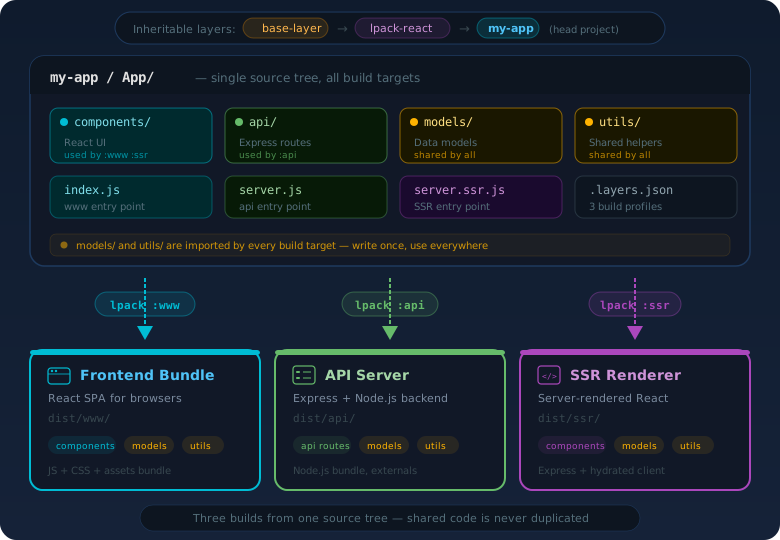
One source tree produces every part of your application. Layers form an inheritance chain, and each build profile compiles its own target — sharing models, utilities, and logic across frontend, backend, and SSR.
One codebase. Multiple build targets. layer-pack lets you ship your frontend, API server, and SSR build from a single project — using inheritable, composable layers that work like OOP inheritance for your entire stack.
Everything you need to build and ship complete applications — frontend, backend, and SSR — from one codebase.
Extend parent layers like classes. Override what you need, inherit the rest. Shared webpack configs, source roots, and dependencies flow through the chain.
Import entire directory trees with a single line. import comps from 'App/ui/(**/*.jsx)' generates a virtual module that auto-exports everything matching the pattern.
Override a parent component and still access the original. import parent from '$super' resolves to the parent layer's version — like calling super() in OOP.
Full-stack from one codebase. Define www, api, ssr profiles in .layers.json — each produces its own bundle with shared code, separate configs, and distinct entry points.
Import from App/components/Foo and layer-pack resolves it through all layer roots in priority order. Head project wins, parent layers provide fallbacks.
Use lpack-react as a base layer for a complete stack: React 18, Webpack 5, Sass, Express SSR, HMR — all inherited from a single npm package and fully overridable.
With multi-profile builds, a single project produces your entire application stack. Shared models, utilities, and business logic live once and are used everywhere.
{
  "default": {
    "rootFolder": "App",
    "extend": ["lpack-react"],
    "vars": { "rootAlias": "App" }
  },
  "www": {
    "basedOn": "default",
    "config": "./webpack.config.www.js",
    "vars": { "targetDir": "dist/www" }
  },
  "api": {
    "basedOn": "default",
    "config": "./webpack.config.api.js",
    "vars": {
      "externals": true,
      "targetDir": "dist/api"
    }
  }
}my-app/
App/
components/ # React UI (www build)
api/ # Express routes (api build)
models/ # Shared across all builds
utils/ # Shared across all builds
index.js # www entry point
server.js # api entry point
webpack.config.www.js
webpack.config.api.js
.layers.json# Build the React frontend
npx lpack :www
# Build the Node.js API server
npx lpack :api
# Both share App/models/ and App/utils/Your frontend components, API routes, and server-side rendering code all live in the same source tree. Shared modules like data models, validation logic, and utilities are written once and imported by every build profile — no duplication, no sync issues.
Publish a complete, working application stack as an npm package. Consumers inherit everything — webpack config, source files, components, server logic — and override only what they need. No ejecting, no copy-paste.
.layers.json. You inherit all of its source files and build configuration automatically.$super to wrap or extend the original instead of replacing it entirely.my-base-layer/ # published to npm
App/
components/Header.jsx # default Header
components/Footer.jsx # default Footer
config/theme.js # default theme
server.js # Express SSR server
webpack.config.js # full webpack setup
.layers.json # exposes rootFolder: "App"my-app/
App/
components/Header.jsx # overrides Header
pages/Home.jsx # adds new page
.layers.json # extend: ["my-base-layer"]
# Footer, theme, server, webpack config
# are all inherited from my-base-layer.
# Header is overridden by your version.$super keyword even lets you call the parent's version, just like super() in OOP.
Create a .layers.json, write your entry file, and build.
{
  "default": {
    "rootFolder": "App",
    "extend": ["lpack-react"],
    "config": "./webpack.config.js",
    "vars": {
      "rootAlias": "App",
      "devPort": 3000,
      "project": "my-app"
    }
  },
  "api": {
    "basedOn": "default",
    "config": "./webpack.config.api.js",
    "vars": {
      "targetDir": "dist/api"
    }
  }
}const layerPack = require('layer-pack');
const lPackCfg = layerPack.getConfig();
module.exports = [
{
entry : { App: lPackCfg.vars.rootAlias },
output : {
path: layerPack.getHeadRoot() + '/dist/'
},
plugins: [ layerPack.plugin() ],
module : {
rules: [{
test: /\.jsx?$/,
exclude: layerPack.isFileExcluded(),
use: 'babel-loader'
}]
}
}
];# Build the default profile
npx lpack
# Build the API profile
npx lpack :api
# Start dev server with HMR
npx lpack-dev-serverOne source tree produces every part of your application. Layers form an inheritance chain, and each build profile compiles its own target — sharing models, utilities, and logic across frontend, backend, and SSR.
layer-pack solves real problems for teams building full-stack applications and reusable infrastructure.
Teams maintaining multiple apps can publish a base layer with shared webpack configs, babel presets, common components, API middleware, and server logic. Each app inherits and overrides only what it needs — across both frontend and backend.
Monorepos with multiple frontends can share a common build layer. Each app lives in its own package, extends the shared layer, and builds independently with its own profiles.
Publish a fully working application as an npm package. Consumers inherit your entire stack — webpack config, source files, components, server logic — and override any piece without ejecting. Updates flow through npm update.
Build your React frontend, Node.js API server, and SSR build from the same source tree. Shared models, validation, and utilities are written once. Each target is a separate build profile with its own webpack config and entry point.
Install layer-pack and build your first inheritable layer in minutes.